GOALS: Design a robot that can draw a shape using inverse kinematics SKILLS: CAD, Kinematics, MATLAB, MicroPython, ESP32
This was a 2-week long project for my Introductory Robotics class. The requirements for this project were just to create a 2-degree-of-freedom arm that uses inverse kinematics (IK) to control the end effector to draw a shape.
Kinematics Theory
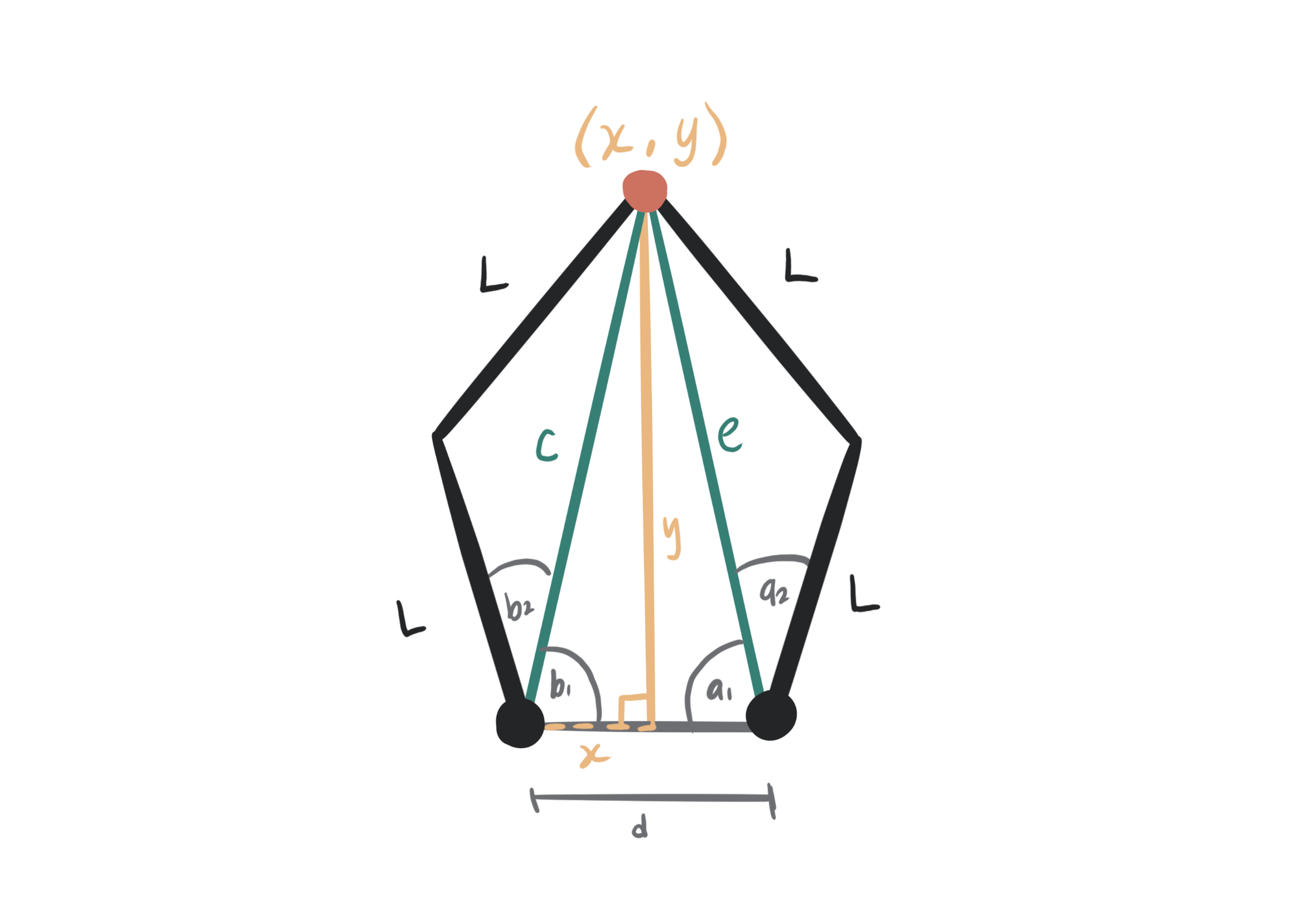
Here's the IK I used to correlate an end effector point to servo angles. It's essentially just a bit of trigonometry.
Using Pythagorean Theorem, Arctan, and a simplified Law of Cosines:
MATLAB Simulation
Before going straight to incorporating the kinematics with the mechanical system, I wanted to simulate everything in MATLAB to make sure that my logic was sound. So I made a MATLAB script that models the linkage system, and you can input an array of points and it will draw it out! Let it be known that this was programmed by hand, and the only time AI was used was to generate the array of points for the star shape.
% endefactor coordinates
x = 75;
y = 120;

% Linkage parameters
L = 122.125;
d = 100;

% Array of points we want to move to
vertLine = [50 180; 50 150; 50 120; 50 90; 50 60; 50 30;];
horizLine = [-10 150; 0 150; 20 150; 40 150; 60 150; 80 150; 100 150; 120 150;];
square = [-25 25; 125 25; 125 200; -25 200; -25 25];

circle = generate_circle([50, 175], 25, 5);
star = generate_star([50, 150], 25, 50, 5, 5);


% Setting up plot
figure;
axis equal;
axis([  -200 300 -200 500]);
grid on;
hold on;

animateShape(star, d, L);

disp(star);

function animateShape(points, d, L)
for i = 1:size(points, 1)
	cla;
	for j = 1:i
		plot(points(j, 1), points(j,2), 'go', 'MarkerSize', 2, 'MarkerFaceColor', 'g');
	end

	x = points(i, 1);
	y = points(i, 2);

	% plotting servo links
	angles = findAngles(x, y, d, L);
	joint1 = drawLinkage(angles(2), 0, 0, L);
		% disp("Joint1 endPoints: " + joint1)
	joint2 = drawLinkage(angles(1), d, 0, L);
		% disp("Joint2 endPoints: " + joint2)

	% plotting endefactor links
	plot([joint1(1) x], [joint1(2) y], 'b-', 'LineWidth', 3);
		% disp("Length of Endefactor Linkage:" + sqrt((joint1(1) - x)^2 + (joint1(2) - y)^2))
	plot([joint2(1) x], [joint2(2) y], 'b-', 'LineWidth', 3);
		% disp("Length of Endefactor Linkage:" + sqrt((joint2(1) - x)^2 + (joint2(2) - y)^2))
	plot(x, y, 'ro', 'MarkerFaceColor', 'r'); % endefactor joint

	pause(0.01);
end

end

function endPoints = drawLinkage(theta, xo, yo, L)

% Doing trig to find the end point of linkage
xf = xo - L*cos(theta);
yf = yo + L*sin(theta);

% plotting linkage
plot([xo xf], [yo yf], 'b-', 'LineWidth', 3);
plot(xo, yo, 'ro', 'MarkerFaceColor', 'r'); % base joint
plot(xf, yf, 'ko', 'MarkerFaceColor', 'k'); % end joint

% disp("Length of Servo Linkage:" + sqrt((xo - xf)^2 + (yo - yf)^2))

endPoints = [xf, yf];

end

% input the endefactor coordinates, distance between, and length of arms
% output the two servo angles from the left face to ground
function angles = findAngles(x, y, d, L)

% inverse pythag on inner triangle // this is good
b_c = sqrt(x^2 + y^2);
a_e = sqrt((d - x)^2 + y^2);

% find the inner angles on inner triangle // this is good
b1 = atan2(y, x);
a1 = atan2(y, d-x);

% law of cosines to find the middle angle //maybe not?                                                                                                                        a
a2 = acos(a_e/(2*L));
b2 = acos(b_c/(2*L));

% weird conditional stuff
af = (a1 + a2);
bf  = pi - (b1 + b2);

% if x < 0
%     af = pi + (a1 + a2);
%     bf  = pi - (b1 + b2);
% elseif x > d
%     af = (a1 + a2);
%     bf  = -1 * (b1 + b2);
% end

angles = [af, bf];
disp(angles)
% disp("Angles (rad): " + angles)
% disp("Angles (deg): " + rad2deg(angles))
end


% These last two functions are AI Generated - used to create an array of
% points for the linkages to move to

function points = generate_circle(origin, r, spacing)

circumference = 2 * pi * r;
numPoints = round(circumference / spacing);

theta = linspace(0, 2*pi, numPoints+1);  % +1 to close the circle

x = origin(1) + r * cos(theta);
y = origin(2) + r * sin(theta);

points = [x(:), y(:)];
end

function star_points = generate_star(origin, r_outer, r_inner, num_points, spacing)
%GENERATE_STAR Generates coordinates for a star outline
%
% INPUTS:
%   origin    - [x0, y0] center of the star
%   r_outer   - radius of the star's outer points
%   r_inner   - radius of the star's inner points
%   num_points- number of star points (5 for classic star)
%   spacing   - approximate distance between points along the outline
%
% OUTPUT:
%   star_points - N×2 array of [x y] coordinates along the star outline

% Step 1: Generate outer and inner points
angles_outer = (0:num_points-1)*(2*pi/num_points) - pi/2; % start top
x_outer = origin(1) + r_outer*cos(angles_outer);
y_outer = origin(2) + r_outer*sin(angles_outer);

angles_inner = angles_outer + pi/num_points;
x_inner = origin(1) + r_inner*cos(angles_inner);
y_inner = origin(2) + r_inner*sin(angles_inner);

% Interleave outer and inner points
x_star = zeros(1, num_points*2+1);
y_star = zeros(1, num_points*2+1);
x_star(1:2:end-1) = x_outer;
x_star(2:2:end-1) = x_inner;
x_star(end) = x_outer(1);  % close the star
y_star(1:2:end-1) = y_outer;
y_star(2:2:end-1) = y_inner;
y_star(end) = y_outer(1);

% Step 2: Resample points along the star edges with ~spacing distance
star_points = [];
for i = 1:length(x_star)-1
	% start and end of edge
	p1 = [x_star(i), y_star(i)];
	p2 = [x_star(i+1), y_star(i+1)];

	% distance and number of segments
	d = norm(p2 - p1);
	n_seg = max(1, round(d/spacing));  % at least one segment

	% interpolate points along the edge
	t = linspace(0, 1, n_seg+1);
	edge_points = (1-t)'*p1 + t'*p2;  % linear interpolation
	star_points = [star_points; edge_points(1:end-1,:)]; % avoid duplicates
end
star_points = [star_points; star_points(1,:)];  % close star
end
from machine import PWM, Pin
import time
import math
servo1 = PWM(Pin(19), freq=50, duty_u16=0)
servo2 = PWM(Pin(18), freq=50, duty_u16=0)

#Physical Robot Parameters
d = 100;
L = 122.125;

def setAngle(servo, rad):

	scaledNs = ((rad - 0) / (math.pi - 0) * (2500 - 500)) + 500

	print("Servo ", servo, " going to ", rad);

	servo.duty_ns(int(scaledNs*1000))


# input the endefactor coordinates, distance between, and length of arms
# output the two servo angles from the right face to ground
def findAngles(x, y):

	b_c = math.sqrt(x**2 + y**2);
	a_e = math.sqrt((d - x)**2 + y**2);


	b1 = math.atan2(y, x);
	a1 = math.atan2(y, d-x);

	a2 = math.acos(a_e/(2*L));
	b2 = math.acos(b_c/(2*L));

	af = math.pi - (a1 + a2);
	bf  = (b1 + b2);


	angles = [bf, af];
	return angles

import math

def generate_circle(origin, r, spacing):

	circumference = 2 * math.pi * r
	num_points = round(circumference / spacing)

	points = []
	for i in range(num_points + 1):  # +1 to close the circle
		theta = 2 * math.pi * i / num_points
		x = origin[0] + r * math.cos(theta)
		y = origin[1] + r * math.sin(theta)
		points.append((x, y))

	return points

import math

def generate_star(origin, r_outer, r_inner, num_points, spacing):
	"""
	Generate coordinates for a star outline in MicroPython.

	Parameters:
		origin      -- tuple (x0, y0), center of the star
		r_outer     -- radius of outer points
		r_inner     -- radius of inner points
		num_points  -- number of star points (5 for classic star)
		spacing     -- approximate distance between points along edges

	Returns:
		star_points -- list of (x, y) tuples along the star outline
	"""

	x0, y0 = origin

	# Step 1: Generate outer and inner points
	angles_outer = [(2*math.pi*i/num_points - math.pi/2) for i in range(num_points)]
	angles_inner = [angle + math.pi/num_points for angle in angles_outer]

	x_outer = [x0 + r_outer*math.cos(a) for a in angles_outer]
	y_outer = [y0 + r_outer*math.sin(a) for a in angles_outer]

	x_inner = [x0 + r_inner*math.cos(a) for a in angles_inner]
	y_inner = [y0 + r_inner*math.sin(a) for a in angles_inner]

	# Interleave outer and inner points
	x_star = []
	y_star = []
	for i in range(num_points):
		x_star.append(x_outer[i])
		y_star.append(y_outer[i])
		x_star.append(x_inner[i])
		y_star.append(y_inner[i])

	# Close the star
	x_star.append(x_outer[0])
	y_star.append(y_outer[0])

	# Step 2: Resample points along the star edges
	star_points = []

	for i in range(len(x_star)-1):
		x1, y1 = x_star[i], y_star[i]
		x2, y2 = x_star[i+1], y_star[i+1]

		# Distance between points
		dx = x2 - x1
		dy = y2 - y1
		d = math.sqrt(dx*dx + dy*dy)

		# Number of segments
		n_seg = max(1, round(d / spacing))

		# Interpolate points along the edge
		for j in range(n_seg):
			t = j / n_seg
			x = x1 + t*dx
			y = y1 + t*dy
			star_points.append((x, y))

	# Close the star by adding the first point again
	star_points.append(star_points[0])

	return star_points


star = generate_star((50, 150), 25, 50, 5, 10)
circle = generate_circle((25, 150), 25, 5)
vertLine = [(50, 180), (50, 150), (50, 120), (50, 90), (50, 60), (50, 30)]
horizLine = [(-10, 150), (0, 150), (20, 150), (40, 150), (60, 150), (80, 150), (100, 150), (120, 150)]
square = [(-25, 25), (125, 25), (125, 200), (-25, 200), (-25, 25)]

print(circle);

while True:
	for x, y in star:
		angles = findAngles(x, y);

	#     print(angles)
	#     print("servo1 ", angles[1]);
	#     print("servo2: ", angles[0]);

		setAngle(servo1, angles[1]);
		setAngle(servo2, angles[0]);

		time.sleep(0.1);

print("done!");
Hardware
Mechanical Debugging
This first prototype of the arm linkages I designed. The issue here was that it didn't have as big a range of motion as I would have liked. I fixed this by giving more space between the linkage and the bearings, and also offsetting the bearing from the arm of the linkage
Also, I originally planned on using the encoders mounted to the mirrored side with the black linkages, but due to the nature of a 2-week long project, I found it more worthwhile to spend my time making sure the kinematics of the robot worked.
that one issue that drove me crazy
Ok do you see how the star is warped? Like its kind of squished in the Y axis? I spent SO LONG trying to figure out why this was happening. The MATLAB simulation helped me prove it wasn't a code issue, and when I was looking at the mechanical system I realized that I think this five-bar linkage setup is a little fundamentally flawed. Especially compared to the X-axis, the Y-axis is controlled by such minute changes in servo angles that it makes it really hard to accurately control - especially given the generic servo motors that I had. I think if I had all the time in the world I would experiment with better servo motors with higher step resolution, or potentially switching to motors and trying to do some fancy gear ratio stuff.

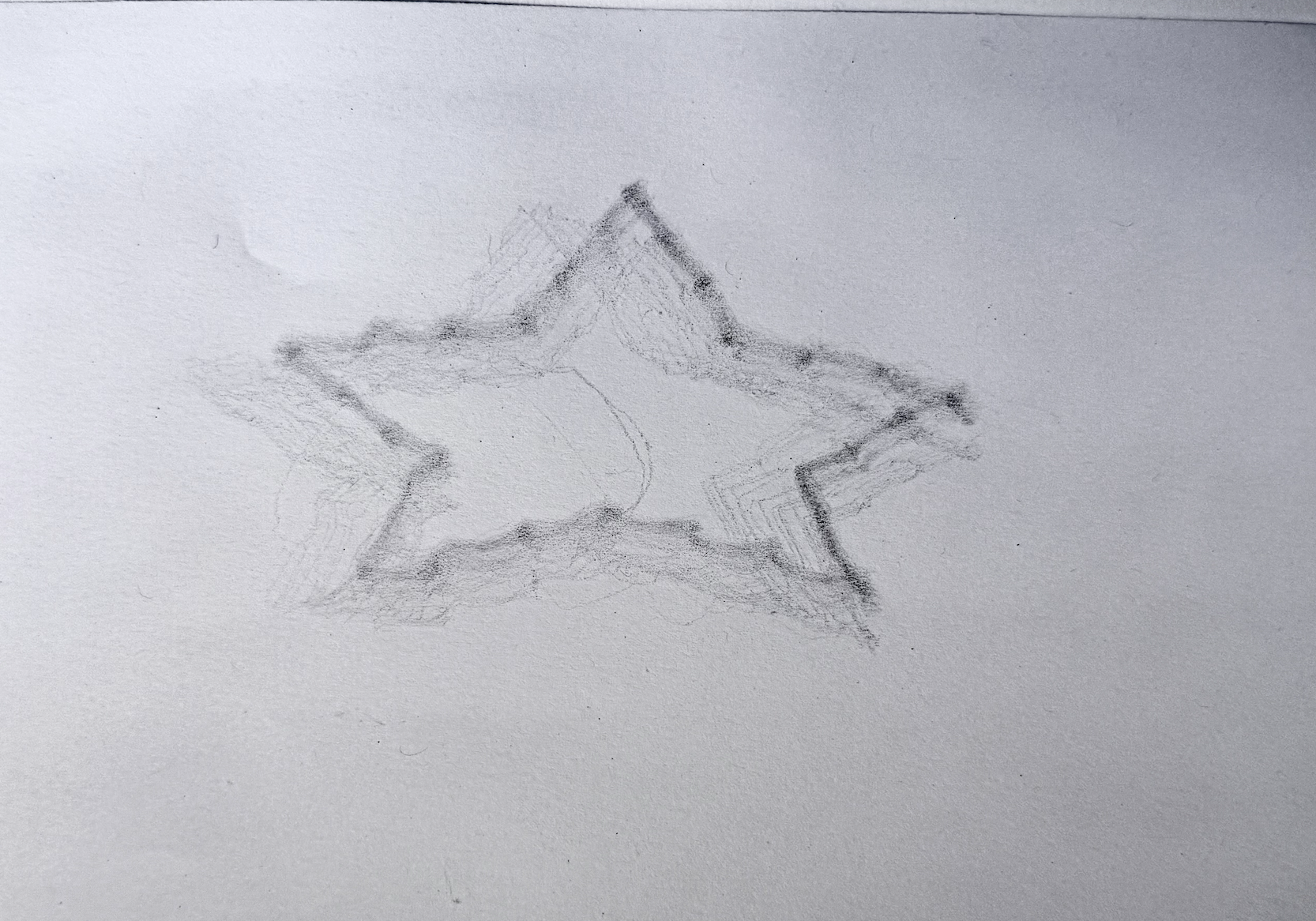 Ok do you see how the star is warped? Like its kind of squished in the Y axis? I spent SO LONG trying to figure out why this was happening. The MATLAB simulation helped me prove it wasn't a code issue, and when I was looking at the mechanical system I realized that I think this five-bar linkage setup is a little fundamentally flawed. Especially compared to the X-axis, the Y-axis is controlled by such minute changes in servo angles that it makes it really hard to accurately control - especially given the generic servo motors that I had. I think if I had all the time in the world I would experiment with better servo motors with higher step resolution, or potentially switching to motors and trying to do some fancy gear ratio stuff.